
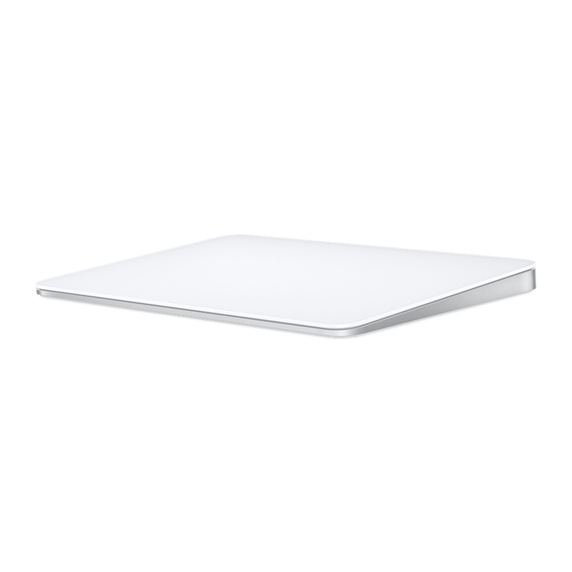

Magic Trackpad – MK2D3
Magic Trackpad is wireless and rechargeable, and it includes the full range of Multi-Touch gestures and Force Touch technology. Sensors underneath the trackpad surface detect subtle differences in the amount of pressure you apply, bringing more functionality to your fingertips and enabling a deeper connection to your content. It features a large edge-to-edge glass surface area, making scrolling and swiping through your favorite content more productive and comfortable than ever.
Magic Trackpad pairs automatically with your Mac, so you can get to work right away. The incredibly long-lasting internal battery will power it for about a month or more between charges, and it also includes a woven USB-C to Lightning Cable that lets you pair and charge by connecting to a USB-C port on your Mac.
What’s in the Box
Magic Trackpad
USB-C to Lightning Cable
System Requirements
Bluetooth-enabled Mac with OS X 10.11 or later
iPad with iPadOS 13.4 or later
Compatibility
iPad Models
iPad Pro 12.9-inch (5th generation)
iPad Pro 12.9-inch (4th generation)
iPad Pro 12.9-inch (3rd generation)
iPad Pro 12.9-inch (2nd generation)
iPad Pro 12.9-inch (1st generation)
iPad Pro 11-inch (3rd generation)
iPad Pro 11-inch (2nd generation)
iPad Pro 11-inch (1st generation)
iPad Pro 10.5-inch
iPad Pro 9.7-inch
iPad Air (4th generation)
iPad Air (3rd generation)
iPad Air 2
iPad (8th generation)
iPad (7th generation)
iPad (6th generation)
iPad (5th generation)
iPad mini (5th generation)
iPad mini 4
Mac Models
MacBook Air (M1, 2020)
MacBook Air (Retina, 13-inch, 2020)
MacBook Air (Retina, 13-inch, 2018 – 2019)
MacBook Air (13-inch, Early 2015 – 2017)
MacBook Air (11-inch, Early 2015)
MacBook Pro (13-inch, M1, 2020)
MacBook Pro (13-inch, 2020)
MacBook Pro (16-inch, 2019)
MacBook Pro (13-inch, 2016 – 2019)
MacBook Pro (15-inch, 2016 – 2019)
MacBook Pro (Retina, 13-inch, Late 2012 – 2015)
MacBook Pro (Retina, 15-inch, Mid 2012 – 2015)
MacBook (Retina, 12-inch, Early 2015 – 2017)
iMac (24-inch, M1, 2021)
iMac (Retina 4K, 21.5-inch, 2019)
iMac (Retina 5K, 27-inch, 2019 – 2020)
iMac (Retina 4K, 21.5-inch, 2017)
iMac (Retina 5K, 27-inch, 2017)
iMac (Retina 4K, 21.5-inch, Late 2015)
iMac (Retina 5K, 27-inch, Late 2014 – 2015)
iMac Pro (2017)
Mac Pro (2019)
Mac Pro (Late 2013)
Mac mini (M1, 2020)
Mac mini (2018)
Mac mini (Late 2014)
Note* Due to Rapid Change in Exchange Rate, all the Prices are affected so please re-confirm the prices before ordering – Call or Whatsapp: 0335-2253184 or email us: info@appleshop.com.pk
Magic Trackpad is wireless and rechargeable, and it includes the full range of Multi-Touch gestures and Force Touch technology. Sensors underneath the trackpad surface detect subtle differences in the amount of pressure you apply, bringing more functionality to your fingertips and enabling a deeper connection to your content. It features a large edge-to-edge glass surface area, making scrolling and swiping through your favorite content more productive and comfortable than ever.
Magic Trackpad pairs automatically with your Mac, so you can get to work right away. The incredibly long-lasting internal battery will power it for about a month or more between charges, and it also includes a woven USB-C to Lightning Cable that lets you pair and charge by connecting to a USB-C port on your Mac.
What’s in the Box
Magic Trackpad
USB-C to Lightning Cable
System Requirements
Bluetooth-enabled Mac with OS X 10.11 or later
iPad with iPadOS 13.4 or later
Compatibility
iPad Models
iPad Pro 12.9-inch (5th generation)
iPad Pro 12.9-inch (4th generation)
iPad Pro 12.9-inch (3rd generation)
iPad Pro 12.9-inch (2nd generation)
iPad Pro 12.9-inch (1st generation)
iPad Pro 11-inch (3rd generation)
iPad Pro 11-inch (2nd generation)
iPad Pro 11-inch (1st generation)
iPad Pro 10.5-inch
iPad Pro 9.7-inch
iPad Air (4th generation)
iPad Air (3rd generation)
iPad Air 2
iPad (8th generation)
iPad (7th generation)
iPad (6th generation)
iPad (5th generation)
iPad mini (5th generation)
iPad mini 4
Mac Models
MacBook Air (M1, 2020)
MacBook Air (Retina, 13-inch, 2020)
MacBook Air (Retina, 13-inch, 2018 – 2019)
MacBook Air (13-inch, Early 2015 – 2017)
MacBook Air (11-inch, Early 2015)
MacBook Pro (13-inch, M1, 2020)
MacBook Pro (13-inch, 2020)
MacBook Pro (16-inch, 2019)
MacBook Pro (13-inch, 2016 – 2019)
MacBook Pro (15-inch, 2016 – 2019)
MacBook Pro (Retina, 13-inch, Late 2012 – 2015)
MacBook Pro (Retina, 15-inch, Mid 2012 – 2015)
MacBook (Retina, 12-inch, Early 2015 – 2017)
iMac (24-inch, M1, 2021)
iMac (Retina 4K, 21.5-inch, 2019)
iMac (Retina 5K, 27-inch, 2019 – 2020)
iMac (Retina 4K, 21.5-inch, 2017)
iMac (Retina 5K, 27-inch, 2017)
iMac (Retina 4K, 21.5-inch, Late 2015)
iMac (Retina 5K, 27-inch, Late 2014 – 2015)
iMac Pro (2017)
Mac Pro (2019)
Mac Pro (Late 2013)
Mac mini (M1, 2020)
Mac mini (2018)
Mac mini (Late 2014)
Note* Due to Rapid Change in Exchange Rate, all the Prices are affected so please re-confirm the prices before ordering – Call or Whatsapp: 0335-2253184 or email us: info@appleshop.com.pk
Related products
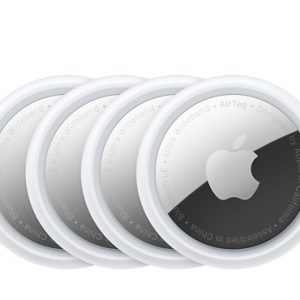
AirTag – 4 Pack – MX542
Requires iPhone SE, iPhone 6s or later, or iPod touch (7th generation) with iOS 14.5 or later, or iPad Pro, iPad (5th generation or later), iPad Air 2 or later, or iPad mini 4 or later with iPadOS 14.5 or later.
Lose your knack for losing things.
AirTag is an easy way to keep track of your stuff. Attach one to your keys, slip another one in your backpack. And just like that, they’re on your radar in the Find My app. AirTag has your back.
Note* Due to Rapid Change in Exchange Rate, all the Prices are affected so please re-confirm the prices before ordering – Call or Whatsapp: 0335-2253184 or email us: info@appleshop.com.pk

USB-C Digital AV Multiport Adapter – MJ1K2
Product Information:
-
The USB-C Digital AV Multiport Adapter lets you connect your MacBook with USB-C port to an HDMI display, while also connecting a standard USB device and a USB-C charging cable.
This adapter allows you to mirror your MacBook display to your HDMI-enabled TV or display in up to 1080p at 60Hz or UHD (3840×2160) at 30Hz. It also outputs video content like movies and captured video. Simply connect the adapter to the USB-C port on your MacBook and then to your TV or projector via an HDMI cable (sold separately).
Use the standard USB port to connect devices such as your flash drive or camera or a USB cable for syncing and charging your iPhone, iPad, or iPod. You can also connect a charging cable to the USB-C port to charge your MacBook.
Note: The Apple USB-C Digital AV Multiport Adapter is not compatible with the G-Tech G-DRIVE mobile USB 3.0 Hard Drive (Apple part number HF4F2VC/A).


Apple 60W MagSafe 2 Power Adapter (MacBook Pro with 13-inch Retina display)
Product Information:
-
The 60W MagSafe 2 Power Adapter features a magnetic DC connector so if someone should trip over it, the cord disconnects harmlessly and your MacBook Pro stays put safely. It also helps prevent fraying or weakening of the cables over time. In addition, the magnetic DC helps guide the plug into the system for a quick and secure connection.
When the connection is secure, an LED located at the head of the DC connector lights up; an amber light lets you know that your notebook is charging, while a green light tells you that you have a full charge. An AC cord is provided with the adapter for maximum cord length, while the AC wall adapter (also provided) gives you an even easier and more compact way to travel.
Designed to be the perfect traveling companion, the adapter has a clever design which allows the DC cable to be wound neatly around itself for easy cable storage.
Compatible with MacBook Pro with 13-inch Retina display.
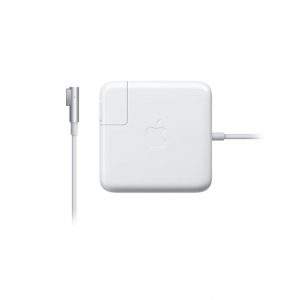
Apple 60W MagSafe Power Adapter (for MacBook and 13-inch MacBook Pro)
The 60 Watt MagSafe Power Adapter features a magnetic DC connector that ensures your power cable will disconnect if it experiences undue strain and helps prevent fraying or weakening of the cables over time. In addition, the magnetic DC helps guide the plug into the system for a quick and secure connection.
When the connection is secure, an LED located at the head of the DC connector will light; an amber light lets you know that your portable is charging, while a green light tells you that you have a full charge. An AC cord is provided with the adapter for maximum cord length, while the AC wall adapter (also provided) gives users an even easier and more compact way to travel.
Designed to be the perfect traveling companion, the adapter has a clever design which allows the DC cable to be wound neatly around itself for easy cable storage.
This power adapter recharges the lithium polymer battery while the system is off, on, or in sleep mode. It also powers the system if you choose to operate without a battery.

Lightning to USB Cable – MD818
Product Information:
-
This USB 2.0 cable connects your iPhone, iPad, or iPod with Lightning connector to your computer’s USB port for syncing and charging or to the Apple USB Power Adapter for convenient charging from a wall outlet
Compatibility:
iPhone 5, iPhone 5C, iPhone 5S, iPhone 6, iPhone 6 Plus
iPad with Retina, iPad Mini, iPad mini 2, iPad Air, iPad Air 2, iPad Mini 3
iPod Nano 7th Generation, iPod Touch 5th Generation

Apple 5W USB Power Adapter – MD810
Product Information
-
Featuring an ultracompact design, this power adapter offers fast, efficient charging at home, in the office, or on the go. It works with any Apple Watch, iPhone, or iPod model.
Compatibility:
iPhone, iPhone 3, iPhone 3GS, iPhone 4, iPhone 4S, iPhone 5, iPhone 5C, iPhone 5S, iPhone 6, iPhone 6 Plus
iPod Classic, iPod Nano, iPod Shuffle, iPod Touch